WPFTS Pro Main Site WPFTS Community Forum
    • Recent
    • Tags
    • Popular
    • Register
    • Login
    Get WPFTS Pro today with 25% discount!

    How to implement FullTextSearch on a page?

    Scheduled Pinned Locked Moved Recipes and Known Solutions
    25 Posts 2 Posters 8.3k Views 2 Watching
    Loading More Posts
    • Oldest to Newest
    • Newest to Oldest
    • Most Votes
    Reply
    • Reply as topic
    Log in to reply
    This topic has been deleted. Only users with topic management privileges can see it.
    • EpsilonAdminE Offline
      EpsilonAdmin
      last edited by

      Hi, Larry

      The Date and Author is not related to WPFTS, it's the theme author preferences - whether include Date and Author info to the post list. However, thanks to WP's hook system we can add this functionality with a simple code.

      I would recommend to place it into the child theme's functions.php, however you can put it into the main theme functions.php if you are not using child theme.

      add_action('astra_entry_content_before', function()
      {
      	if (is_search()) {
      		// Modify search result posts
      		// Add date and author
      		$author = get_the_author();
      		$author_url = get_the_author_link();
      		
      		echo '<span class="post-meta-infos"><time class="date-container minor-meta updated" itemprop="datePublished">'.the_date().'</time><span class="text-sep"> / </span><span class="blog-author minor-meta">by <span class="entry-author-link" itemprop="author"><span class="author"><span class="fn"><a href="'.htmlspecialchars($author_url).'" title="Posts by '.htmlspecialchars($author).'" rel="author">'.htmlspecialchars($author).'</a></span></span></span></span></span>';
      	}
      });
      

      This code will add Date and Author info to search results.

      https://e-wm.org

      S 1 Reply Last reply Reply Quote 0
      • S Offline
        sanfordandson @EpsilonAdmin
        last edited by

        @EpsilonAdmin Thank you!

        On the search results page, when clicking on the titles to open a document, is there a way to make that open in a new browser tab, rather than in the same tab?

        Thanks again.

        EpsilonAdminE 1 Reply Last reply Reply Quote 0
        • EpsilonAdminE Offline
          EpsilonAdmin @sanfordandson
          last edited by

          Hi, Larry

          Yes, we can use Astra-specific hook to add target="_blank" attribute to the title's link.

          Also I made a hook that adds "Download" link below near to "score" value. Unfortunately it's hard to detect filesize at this point (since the file can be located on another server).

          Place this code right below the code that I posted above, in the functions.php:

          
          // Hook to force search result files to open in new tab
          add_filter('astra_the_post_title_before', function($before)
          {
          	if (is_search()) {
          		// Modify the search result title
          		$before = preg_replace('/<a\s+href=/', '<a target="_blank" href=', $before);
          	}
          	
          	return $before;
          });
          
          // Hook to add "Download" link below the excerpt (near the "Score" value)
          add_filter('wpfts_se_output', function($a, $post)
          {
          	if ($a && $post) {
          		if (isset($post['post_type']) && ($post['post_type'] == 'dlp_document')) {
          			// Add Download button
          			$shift = (strlen($a['score']) > 0) ? ' wpfts-shift' : '';
          
          			$link = '';
          
          			$post_id = $post['ID'];
          			
          			$link_type = get_post_meta($post_id, '_dlp_document_link_type', true);
          			$file_size = get_post_meta($post_id, '_dlp_document_file_size', true);
          			$file_id = get_post_meta($post_id, '_dlp_attached_file_id', true);
          			$link_url = get_post_meta($post_id, '_dlp_direct_link_url', true);
          
          			$local_url = false;
          			if ($link_type === 'file') {
          				// The attachment post
          				if ($file_id > 0) {
          				
          					$link = wp_get_attachment_url($file_id);
          				}
          			
          			} elseif ($link_type === 'url') {
          				// The link
          				$link = $link_url;
          			} else {
          				// Unknown link_type
          			
          			}
          			
          			if (strlen($link) > 0) {
          				$a['link'] = '<a target="_blank" class="wpfts-download-link'.$shift.'" href="'.esc_url($link).'"><span>'.__('Download', 'fulltext-search').'</span></a>';
          			}
          		}
          	}
          	
          	return $a;
          }, 10, 2);
          

          Hope this helps. Thanks you!

          https://e-wm.org

          S 1 Reply Last reply Reply Quote 0
          • S Offline
            sanfordandson @EpsilonAdmin
            last edited by

            @EpsilonAdmin This works great except for one small error in the constructed download link. For example, here is the constructed link for one of the search results:

            https://https//staging4.hamlinny.org/documents/assessors-office/assessment-rolls/2019/2019-Final-Roll.pdf

            The second occurrence of the "https//" is unnecessary.

            I tried to fix this, but php is not my strong point.

            Larry

            EpsilonAdminE 1 Reply Last reply Reply Quote 0
            • EpsilonAdminE Offline
              EpsilonAdmin @sanfordandson
              last edited by

              Okay, Larry,

              could you please show me how the links looks like when added to the Document Library Pro document edit window in WP Admin?
              I just checked on my side and I don't see this problem, so I think the difference is how we put links to documents.

              Thanks!

              https://e-wm.org

              S 1 Reply Last reply Reply Quote 0
              • S Offline
                sanfordandson @EpsilonAdmin
                last edited by

                @EpsilonAdmin Attached is a screen cap of one of the documents. The full link for this document is:

                https://staging4.hamlinny.org/documents/assessors-office/assessment-rolls/2019/2019-Final-Roll.pdf

                If you go to my documents page here:

                [https://staging4.hamlinny.org/document-center/](link url)

                and search for the word "Sewer" (without the quotes), this document will be the first one in the search results. Note that the link for the title is correct, while the URL for the Download link is incorrect.
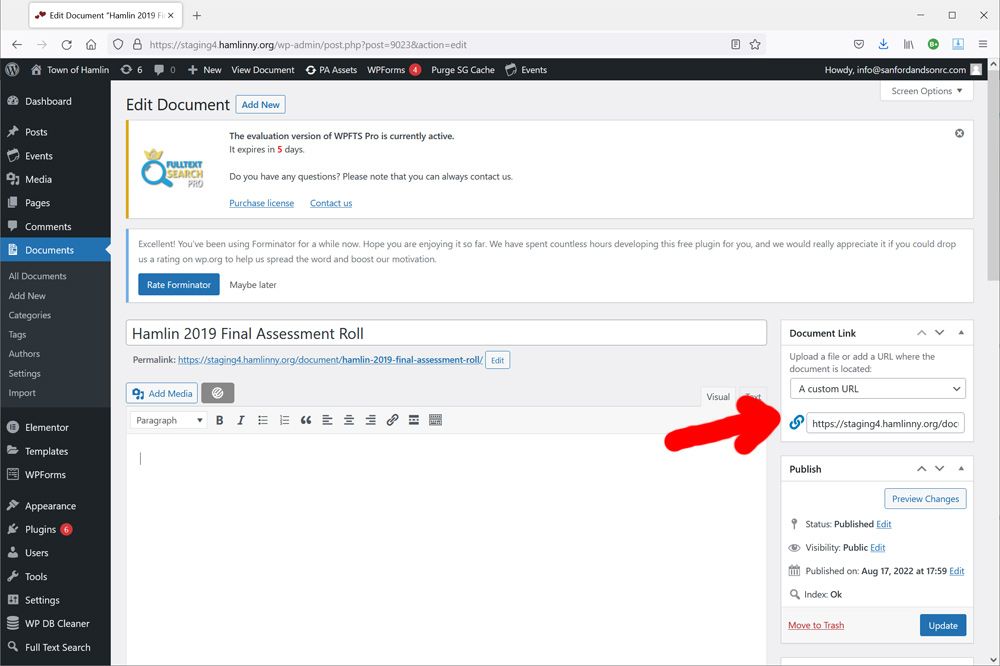
                edit-document.jpg

                EpsilonAdminE 1 Reply Last reply Reply Quote 0
                • EpsilonAdminE Offline
                  EpsilonAdmin @sanfordandson
                  last edited by

                  Okay, Larry,

                  please could you go to the code we added last time and replace 6th line from the end:

                  $a['link'] = '<a target="_blank" class="wpfts-download-link'.$shift.'" href="'.esc_url($link).'"><span>'.__('Download', 'fulltext-search').'</span></a>';
                  

                  by this one:

                  $a['link'] = '<a target="_blank" class="wpfts-download-link'.$shift.'" href="'.htmlspecialchars($link).'"><span>'.__('Download', 'fulltext-search').'</span></a>';
                  

                  (actually only esc_url has been replaced by htmlspecialchars).

                  I think this function breaks the URL somehow on your server (and it's VERY strange).

                  Please let me know. Thanks!

                  https://e-wm.org

                  S 1 Reply Last reply Reply Quote 0
                  • S Offline
                    sanfordandson @EpsilonAdmin
                    last edited by

                    @EpsilonAdmin I replaced esc_url with htmlspecialchars, but that didn't fix the issue. Very strange, indeed.

                    You can see when you mouseover the Download link that the url is incorrect, right? But the link on the title is correct!

                    S 1 Reply Last reply Reply Quote 0
                    • S Offline
                      sanfordandson @sanfordandson
                      last edited by

                      @sanfordandson Could there be something in the .htaccess file that is causing this?

                      EpsilonAdminE 1 Reply Last reply Reply Quote 0
                      • EpsilonAdminE Offline
                        EpsilonAdmin @sanfordandson
                        last edited by

                        I don't think so, it looks like a PHP problem.

                        Which version of the Document Library Pro you are using?

                        https://e-wm.org

                        S 1 Reply Last reply Reply Quote 0
                        • S Offline
                          sanfordandson @EpsilonAdmin
                          last edited by

                          @EpsilonAdmin 1.7.2 (current version)

                          S 1 Reply Last reply Reply Quote 0
                          • S Offline
                            sanfordandson @sanfordandson
                            last edited by

                            @sanfordandson I know it's a cludge, but could you strip out all occurrences of "https//"? That would make the url correct.

                            EpsilonAdminE 1 Reply Last reply Reply Quote 0
                            • EpsilonAdminE Offline
                              EpsilonAdmin @sanfordandson
                              last edited by

                              Okay, Larry

                              I am sure they made some tricks in the plugin to modify URL, but I can't say which tricks, since I only have version 1.1.2 at the moment.

                              So let's go with the "patch" solution. Please replace the line

                              $a['link'] = '<a target="_blank" class="wpfts-download-link'.$shift.'" href="'.htmlspecialchars($link).'"><span>'.__('Download', 'fulltext-search').'</span></a>';
                              

                              with this one

                              $a['link'] = '<a target="_blank" class="wpfts-download-link'.$shift.'" href="'.htmlspecialchars(preg_replace('~^\/\/http~', 'http', $link)).'"><span>'.__('Download', 'fulltext-search').'</span></a>';
                              

                              It should work.

                              https://e-wm.org

                              S 1 Reply Last reply Reply Quote 0
                              • S Offline
                                sanfordandson @EpsilonAdmin
                                last edited by sanfordandson

                                @EpsilonAdmin Wow, still didn't work. I even deleted the astra theme's functions.php file from the server, refreshed the browser (it blew up, as expected), then uploaded the modified functions.php file. I did all this to make sure there was no cache issue. Still doesn't work. Real bizarre.

                                Would it help if I sent you login credentials and ftp credentials via email?

                                EpsilonAdminE 1 Reply Last reply Reply Quote 0
                                • EpsilonAdminE Offline
                                  EpsilonAdmin @sanfordandson
                                  last edited by

                                  Hi, Larry

                                  This would be great, so I can check by myself.
                                  BTW I see a strange error in search results page.

                                  Unfortunately I gonna go right now and will be back in some hours to check WP admin. Please send me access to email.

                                  Thanks!

                                  https://e-wm.org

                                  S 1 Reply Last reply Reply Quote 0
                                  • S Offline
                                    sanfordandson @EpsilonAdmin
                                    last edited by

                                    @EpsilonAdmin Will do.

                                    1 Reply Last reply Reply Quote 0
                                    • EpsilonAdminE Offline
                                      EpsilonAdmin
                                      last edited by

                                      Hi, Larry

                                      The problem with the links has been fixed - just a typo in the code. The code in the messages above is correct.

                                      https://e-wm.org

                                      1 Reply Last reply Reply Quote 0

                                      Hello! It looks like you're interested in this conversation, but you don't have an account yet.

                                      Getting fed up of having to scroll through the same posts each visit? When you register for an account, you'll always come back to exactly where you were before, and choose to be notified of new replies (either via email, or push notification). You'll also be able to save bookmarks and upvote posts to show your appreciation to other community members.

                                      With your input, this post could be even better 💗

                                      Register Login
                                      • First post
                                        Last post

                                      Suggested Topics

                                      • V

                                        Recognize active members in Restrict Content Pro when searching

                                        Watching Ignoring Scheduled Pinned Locked Moved Recipes and Known Solutions
                                        1
                                        0 Votes
                                        1 Posts
                                        458 Views
                                        No one has replied
                                      • EpsilonAdminE

                                        Slow search on a site based on Divi Theme

                                        Watching Ignoring Scheduled Pinned Locked Moved Recipes and Known Solutions
                                        1
                                        0 Votes
                                        1 Posts
                                        1k Views
                                        No one has replied
                                      • EpsilonAdminE

                                        [Solved] The files excerpt is not visible in Scientia Theme

                                        Watching Ignoring Scheduled Pinned Locked Moved Recipes and Known Solutions
                                        1
                                        0 Votes
                                        1 Posts
                                        677 Views
                                        No one has replied
                                      • EpsilonAdminE

                                        [Solved] EduMall theme does not show Smart Excerpts and broken the search results page

                                        Watching Ignoring Scheduled Pinned Locked Moved Recipes and Known Solutions
                                        1
                                        0 Votes
                                        1 Posts
                                        729 Views
                                        No one has replied
                                      • EpsilonAdminE

                                        [Solved] The License become not valid and Update API is not accessible

                                        Watching Ignoring Scheduled Pinned Locked Moved Recipes and Known Solutions license update api ssl https curl
                                        1
                                        0 Votes
                                        1 Posts
                                        945 Views
                                        No one has replied

                                      Additional Resources

                                      • My Account
                                      • Buy WPFTS Pro
                                      • Community Forum
                                      • Affiliate Program
                                      • Privacy Policy
                                      • Terms & Conditions
                                      • Contact Us
                                      • Coupon Partner

                                      Be the first to read the news!

                                      We are always improving our products, adding new functions and fixes. Subscribe now to be the first to get the updates and stay informed about our sales! We are not spammy. Seriously.

                                      Join Us Now!

                                      We are a professional IT-team. Many of us have been working in a Web IT field for more than 10 years. Our advanced experience of software development has been employed in the creation of the WordPress FullText Search plugin. All solutions implemented into the plugin have been used for 5 or more years in over 60 different web-projects.

                                      We are looking forward to your comments, requests and suggestions in relation to the current plugin and future updates.

                                      ewm-logo-450

                                      The forum powered by NodeBB | Contributors