WPFTS Pro Main Site WPFTS Community Forum
    • Recent
    • Tags
    • Popular
    • Register
    • Login
    Get WPFTS Pro today with 25% discount!

    metadata filter in WPFTS widget

    Scheduled Pinned Locked Moved Recipes and Known Solutions
    2 Posts 2 Posters 924 Views 2 Watching
    Loading More Posts
    • Oldest to Newest
    • Newest to Oldest
    • Most Votes
    Reply
    • Reply as topic
    Log in to reply
    This topic has been deleted. Only users with topic management privileges can see it.
    • P Offline
      pfb6736
      last edited by

      Greetings , fantastic product- I have 4 questions , please.

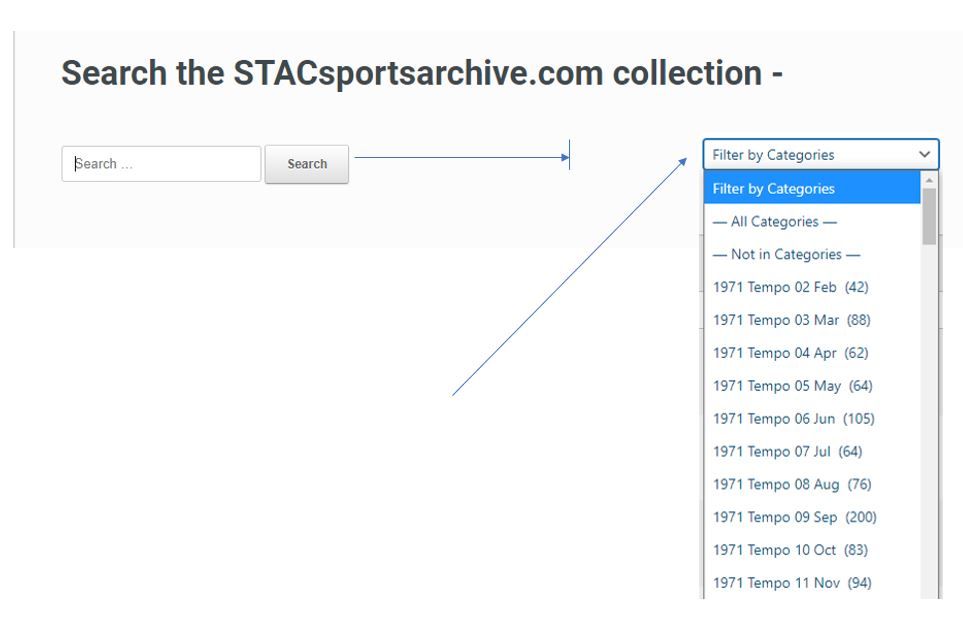
      1. is it possible to lengthen the search bar on the WPFTS widget ?
      2. I would like to filter on categories to further filter the search results with a dropdown ?
      100.JPG

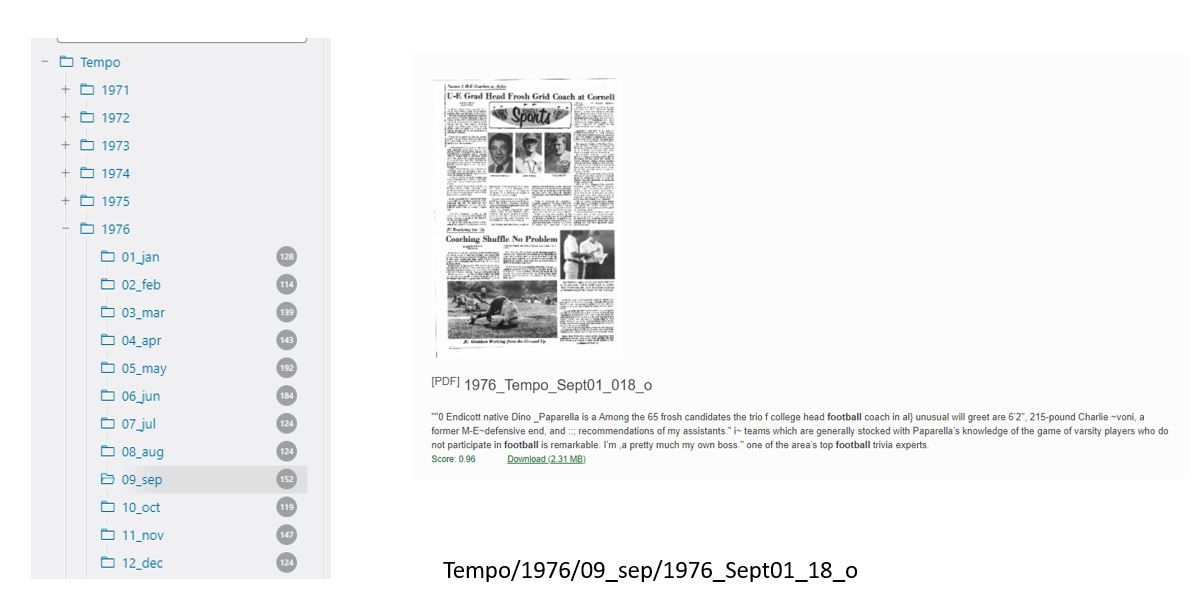
      1. In the search results page , is it possible to put a folder path in the filename - "1976_Tempo_Sept01_018_o" to show up as "Tempo/1976/09_sep/1976_Tempo_Sept01_018_o" ?
      2. Could the keywords be highlighted in the search results ?
      101.JPG

      Thank you

      1 Reply Last reply Reply Quote 0
      • EpsilonAdminE Offline
        EpsilonAdmin
        last edited by

        Hi @pfb6736

        1. Yes, you can do this via CSS, either by adding a new rule to your Theme custom CSS block, or you can use WPFTS Settings / Search & Output / Display / Smart Excerpts CSS editor block.
          I hope it's .widget.widget-search rule, you can set 'width: 100%' to extend widget's width to all available room.

        2. The plugin is growing, but we have not yet a powerful system to make customized search widgets. What I can propose to you is (depending on your PHP/WP knowledge): there is a file /includes/widgets/wpfts_widget.class.php which is actually a native WP search widget with some changes for Live Search functionality.
          I would recommend you to copy this file to your child theme and create your own widget (by adding a select input to existing code). In case you think your knowledge of PHP is not that good, I can gladly help you, but you need to explain to me what exactly you need.

        3. Yes, it's possible via the small code addition. Do you want to show a path to the file instead of the file title? Or it should be an additional line in the search result item? Do you think showing a local path to the file is OKAY and maybe it's better to show Category instead?

        4. As I can see they are highlighted (bolded) but you can change this again in the Smart Excerpts CSS block. For example, this rule will make found words RED and YELLOW highlighted.

        .wpfts-result-item .wpfts-smart-excerpt b {	
        	/* Excerpt text */
        	color: red;
        	background-color: #ff3;
        }
        

        Thanks.

        https://e-wm.org

        1 Reply Last reply Reply Quote 1

        Hello! It looks like you're interested in this conversation, but you don't have an account yet.

        Getting fed up of having to scroll through the same posts each visit? When you register for an account, you'll always come back to exactly where you were before, and choose to be notified of new replies (either via email, or push notification). You'll also be able to save bookmarks and upvote posts to show your appreciation to other community members.

        With your input, this post could be even better 💗

        Register Login
        • First post
          Last post

        Suggested Topics

        • EpsilonAdminE

          Slow search on a site based on Divi Theme

          Watching Ignoring Scheduled Pinned Locked Moved Recipes and Known Solutions
          1
          0 Votes
          1 Posts
          451 Views
          No one has replied
        • EpsilonAdminE

          [Solved] The files excerpt is not visible in Scientia Theme

          Watching Ignoring Scheduled Pinned Locked Moved Recipes and Known Solutions
          1
          0 Votes
          1 Posts
          638 Views
          No one has replied
        • EpsilonAdminE

          [Solved] EduMall theme does not show Smart Excerpts and broken the search results page

          Watching Ignoring Scheduled Pinned Locked Moved Recipes and Known Solutions
          1
          0 Votes
          1 Posts
          683 Views
          No one has replied
        • EpsilonAdminE

          [Solved] The License become not valid and Update API is not accessible

          Watching Ignoring Scheduled Pinned Locked Moved Recipes and Known Solutions license update api ssl https curl
          1
          0 Votes
          1 Posts
          888 Views
          No one has replied
        • EpsilonAdminE

          [Solved] The Astra theme does not show Smart Excerpt for files

          Watching Ignoring Scheduled Pinned Locked Moved Recipes and Known Solutions
          1
          3
          0 Votes
          1 Posts
          1k Views
          No one has replied

        Additional Resources

        • My Account
        • Buy WPFTS Pro
        • Community Forum
        • Affiliate Program
        • Privacy Policy
        • Terms & Conditions
        • Contact Us
        • Coupon Partner

        Be the first to read the news!

        We are always improving our products, adding new functions and fixes. Subscribe now to be the first to get the updates and stay informed about our sales! We are not spammy. Seriously.

        Join Us Now!

        We are a professional IT-team. Many of us have been working in a Web IT field for more than 10 years. Our advanced experience of software development has been employed in the creation of the WordPress FullText Search plugin. All solutions implemented into the plugin have been used for 5 or more years in over 60 different web-projects.

        We are looking forward to your comments, requests and suggestions in relation to the current plugin and future updates.

        ewm-logo-450

        The forum powered by NodeBB | Contributors